What does a dental practice website need?
A dental practice website needs to say what you do and where, answer the insurance and cost question, and make it easy to request a visit. It should also tell a new or nervous patient what the first appointment is like.
- A first screen naming your services, your city and one button.
- A page for each main service.
- Insurance you accept, and how fees work without it.
- What to do in a dental emergency.
- A new-patient page: first visit, forms, what to bring.
- The dentists and team, with names and credentials.
- Hours, address, parking and a phone number you can tap.
What should the first screen of a dental website say?
It should name what you do, your city and the next step. In our opinion, “family and emergency dentistry in Boise” does more than “creating beautiful smiles”, which could be any practice anywhere.
Use one main button, such as “Request a visit”, and check that it shows on a phone without scrolling. If you open early or late, say so here.
Dental website examples
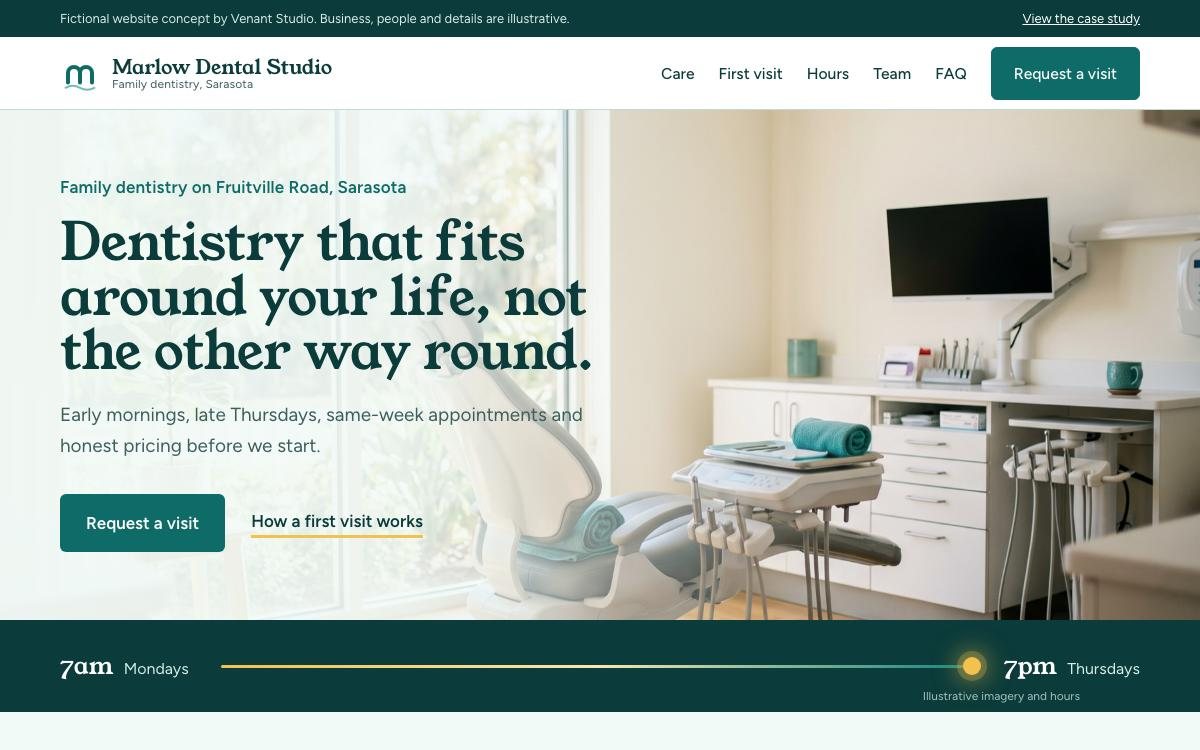
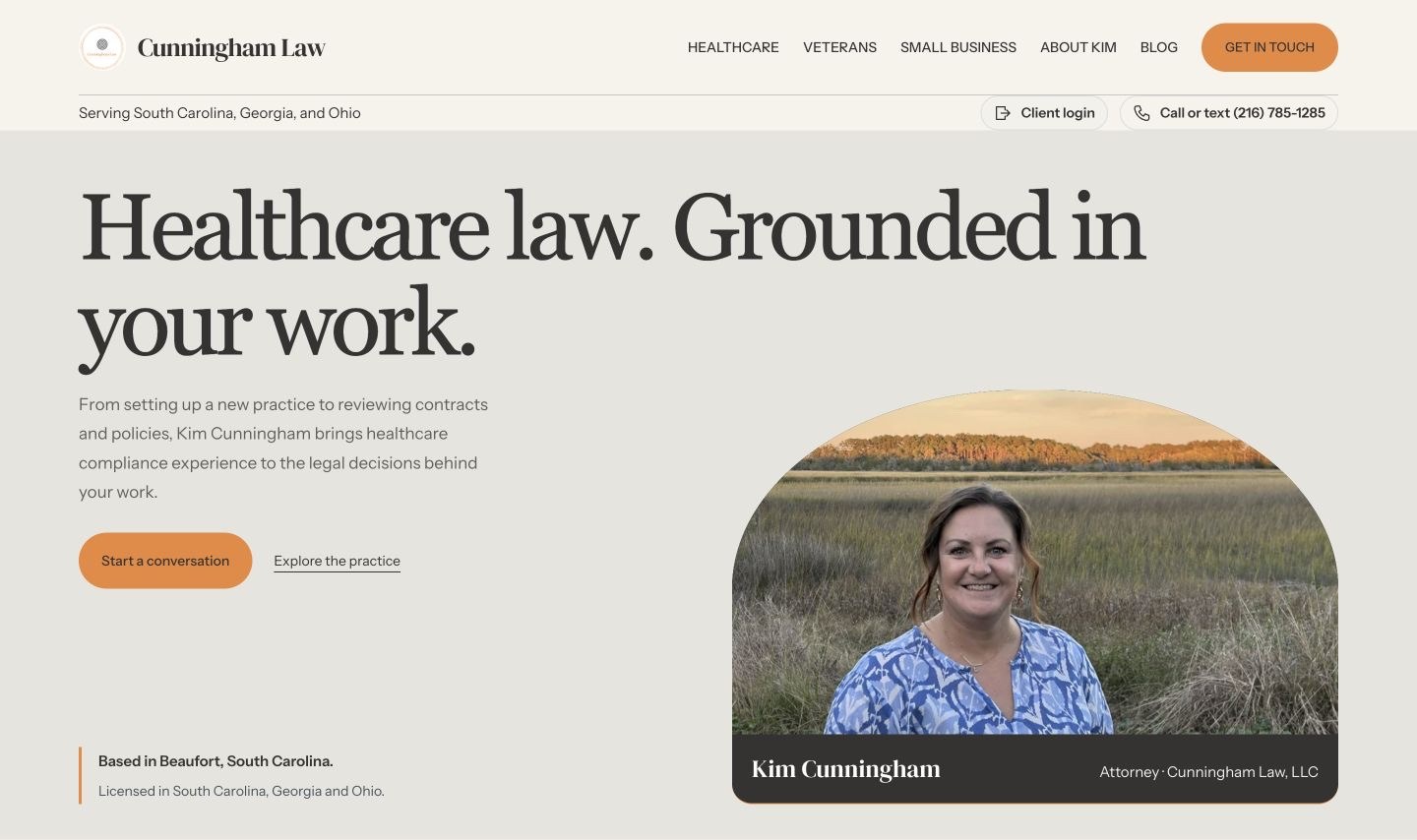
Here’s a dental sample we designed, and a live site we built for a client in another field. Notice how quickly each one tells you who it’s for and what to do next.
Want to see your own practice this way before deciding anything? Send us your details and we’ll design your homepage and send you a private link within 3 business days, free.
Which pages should a dental website have?
Give each main service its own page: cleanings and exams, fillings and crowns, implants, clear aligners, children’s visits, emergencies. One page per service also gives search engines something specific to show for that service and city.
On each page, say who it’s for, how long it takes, what recovery is like and how fees work. Plain answers, in our opinion, do more than stock photos of smiles.
Should a dental website list insurance and prices?
In our opinion, yes. List the plans you’re in network with, and say what happens if someone’s plan isn’t on the list.
For people without insurance, give a new-patient exam fee or a starting price, and explain any membership or payment plan you offer. If you can’t list fees, say when they’ll get the cost in writing.
How should a dental website handle emergencies and new patients?
Put it in plain sight. Someone with a broken tooth shouldn’t have to hunt, so say whether you see emergencies the same day, which number to call and what to do after hours.
For new patients, explain the first visit step by step. A request form should ask for a name, a phone number and a preferred time, in our opinion, and not for medical details.
Can a dental website show patient photos and reviews?
Yes, with written permission. HHS lists dentists among the providers HIPAA covers when they send information electronically in connection with a standard transaction, and the HIPAA rule says a covered entity must obtain an authorization to use protected health information for marketing.
Be careful replying to reviews too. HHS says a California dental practice paid $23,000 to settle after it disclosed patient information in responses to online reviews.
Show typical results. The FTC’s health guidance says testimonials reporting results “more dramatic than users can generally expect are likely to be deceptive”, and that “Results not typical” doesn’t cure that.
What can’t a dental website claim?
Nothing false or misleading. The American Dental Association’s Code says no dentist shall advertise “in a manner that is false or misleading in any material respect”, and warns against statements likely to create “an unjustified expectation about results the dentist can achieve”.
Watch the word “specialist”. The Code lets general dentists announce their services “so long as they avoid any communications that express or imply specialization”, and says they shall also state that the services are provided by general dentists. Check your state dental board’s advertising rules as well.
Does a dental practice need a Google Business Profile?
Yes, it’s worth having one, within Google’s rules. Google says your name shouldn’t include marketing taglines, and that a practitioner shouldn’t have several profiles to cover different specializations.
A solo dentist with a branded practice shares one profile with it, named in Google’s format “[brand/company]: [practitioner name]”. Where several dentists work at one location, the practice has its own profile, and a dentist’s own profile should use only that dentist’s name.
Does a dental website need to be accessible?
Plan on it. ADA.gov says the Americans with Disabilities Act applies to businesses open to the public, including what they offer on the web.
It names barriers you can check for: poor color contrast, images without text alternatives, videos without captions, online forms that aren’t accessible and navigation that only works with a mouse.
An example first screen
For a hypothetical dental practice. Swap in your own services, area, hours and phone number.
Example homepage opening
Family and emergency dentistry in Boise, open at 7 on weekdays
New patients are welcome, and we’ll tell you the cost before we start. [Request a visit] [Call (208) 555-0147]
Plan your first screenExample wording to adapt; this is not a live business enquiry.
Your checklist
Use this while reviewing the website. Your progress is not saved or sent.
Questions to work through
How many pages does a dental website need?
Usually home, about or team, one page for each main service, new patients, insurance and fees, and contact, in our opinion. Start with the services that bring in the most patients and add more over time.
Does HIPAA apply to a dental practice website?
HHS lists dentists among covered providers, but only if they send information electronically in connection with a transaction HHS has adopted a standard for. If that’s you, get written authorization before using a patient’s photo or story in marketing.
Can a general dentist advertise implants or braces?
The American Dental Association’s Code lets general dentists announce the services they offer, as long as they avoid implying specialization and state that general dentists provide them. Check your state dental board’s rules too.
What is the best way to take appointment requests on a dental website?
Use one request path and put it on every page. In our opinion, a short form with a name, a phone number and a preferred time works well, and it shouldn’t ask for medical details.
Can I see what my dental practice’s website would look like before paying?
Yes. Venant Studio offers a free homepage sample: send your details and we’ll design your homepage and send a private link within 3 business days. It’s a sample to look at, not a finished site.
Sources and further reading
Use the original guidance alongside this planning article. The examples here are adaptable starting points, not claims about your business.
- American Dental Association: Code of Ethics, Section 5 (veracity, advertising)
- HHS: Covered entities and business associates
- 45 CFR 164.508: Uses and disclosures for which an authorization is required
- HHS: Settlement with New Vision Dental over disclosures in online review replies (2022)
- FTC: Health products compliance guidance
- ADA.gov: Guidance on web accessibility and the ADA
- Google Business Profile Help: Guidelines for representing your business on Google
- Venant Studio: Marlow Dental Studio, a sample dental website (fictional concept)
- Cunningham Law: a live client website